As AI coding agents like Claude Code, Cursor, and Codex become standard in our daily workflow, developers are adopting notch apps to monitor their sessions. Two popular options for this are OneNotch and AgentNotch.
While both put your agents in the notch or the menu bar, they take different approaches to scope, cost, and system resources. Here is a detailed comparison of OneNotch and AgentNotch, checked against each project's own pages on September 30, 2026.
AgentNotch: The Dedicated Telemetry Tool
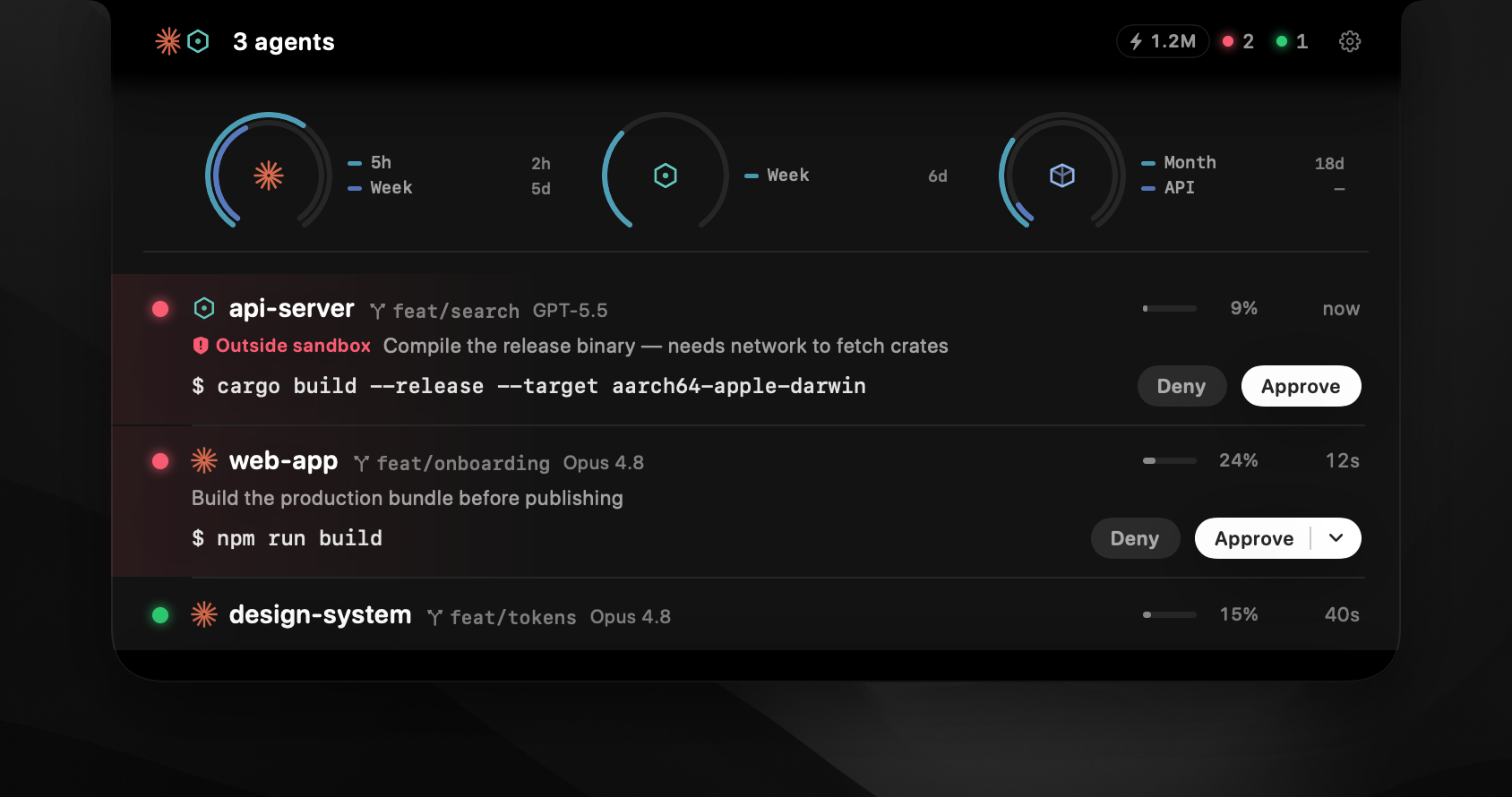
AgentNotch is a specialized, open-source macOS app designed explicitly to monitor AI coding agents. It reads the local session logs of tools like Claude Code and Codex and shows what they are doing, and it falls back to the menu bar on Macs without a notch.
Key Strengths of AgentNotch
- Hyper-Focused on AI: AgentNotch does one thing, tracking AI sessions. It shows every tool call as it happens, token usage, and whether a session is working, waiting or asking for approval.
- Detailed Context: It estimates costs in real time and keeps each session in its own row, with a color for the source tool.
- Approve Inline: For supported agents, you can approve or deny permission requests from the notch without opening the terminal.
- Free and open source: It is MIT-licensed, you can read the code, install it with Homebrew, and it runs locally on macOS 14 or later.
OneNotch: The Utility Hub With an Agent Page
OneNotch, by contrast, is a unified utility designed for developers who want fewer apps on their Mac. It includes a full AI page for Claude Code and Codex, and pairs it with an advanced clipboard manager, media controls, screenshots, translation and quick-access tools.
Key Strengths of OneNotch
- Approvals and questions from the notch: Allow or deny permission requests and answer an agent's questions right from the notch, with a sound when a session needs you. You do not need a dedicated app for this.
- Usage and cost on their own page: A usage tab shows cost, tokens, and your 5-hour and weekly Claude quota as rings or bars, and OneNotch can alert you when an agent finishes or a quota resets. It lives on a separate page, so the everyday view stays calm.
- Session detail on demand: Expand a session to see its model, current step, tools used, working folder and Git branch, then click to jump to the right terminal.
- Broader Utility: Your clipboard history, media controls, file actions and screenshots live in the same notch, so one app replaces several.
- Modest idle cost: OneNotch is engineered with a strict performance budget and published measurements (roughly 7–10% CPU at idle and about 200MB of memory), and it updates when an agent's status changes instead of polling constantly.
AgentNotch vs OneNotch at a glance
| AgentNotch | OneNotch | |
|---|---|---|
| Focus | AI agent telemetry only | Clipboard, screenshots, media, files and AI agents |
| Agents | Claude Code and Codex, plus other tools listed on its site | Claude Code and Codex |
| Approvals from the notch | Yes, for supported agents | Yes |
| Tokens and cost | Yes, estimated in real time | Yes, on the usage page, with quota windows |
| Works on Macs without a notch | Yes, menu bar fallback | Yes, Pill mode |
| Price | Free, open source | Free · Pro $9.99 lifetime, or $6.99 with code LAUNCH30 (AI agents are in the free tier) |
| Requires | macOS 14 or later | macOS 15 or later, Apple Silicon |
Which Should You Choose?
If you are heavily focused on token economics, want to read every tool call as it happens, prefer open-source software, and don't mind running a dedicated, specialized tool for it, AgentNotch is an excellent choice. It is also the better fit if you are on macOS 14 or an Intel Mac.
However, if you want one app instead of several, care deeply about preserving your MacBook's battery life, and want a premium clipboard manager and file actions alongside your agent status, OneNotch is the better fit. It gives you the AI awareness you need, including approvals and usage, without running a separate app for each job.