Search for almost any Mac notch app alongside the word "battery" and you'll find the same complaints: fans spinning up during music playback, MacBooks losing an hour of battery life, Activity Monitor showing a decorative utility working harder than the browser with forty tabs open.
The reputation is earned. A notch app is in one of the hardest positions an app can occupy: it lives on screen all day, every day. A regular app that wastes a little CPU gets closed eventually. A notch app that wastes a little CPU wastes it from login to shutdown. Small inefficiencies don't stay small — they compound into heat, fan noise, and drained batteries.
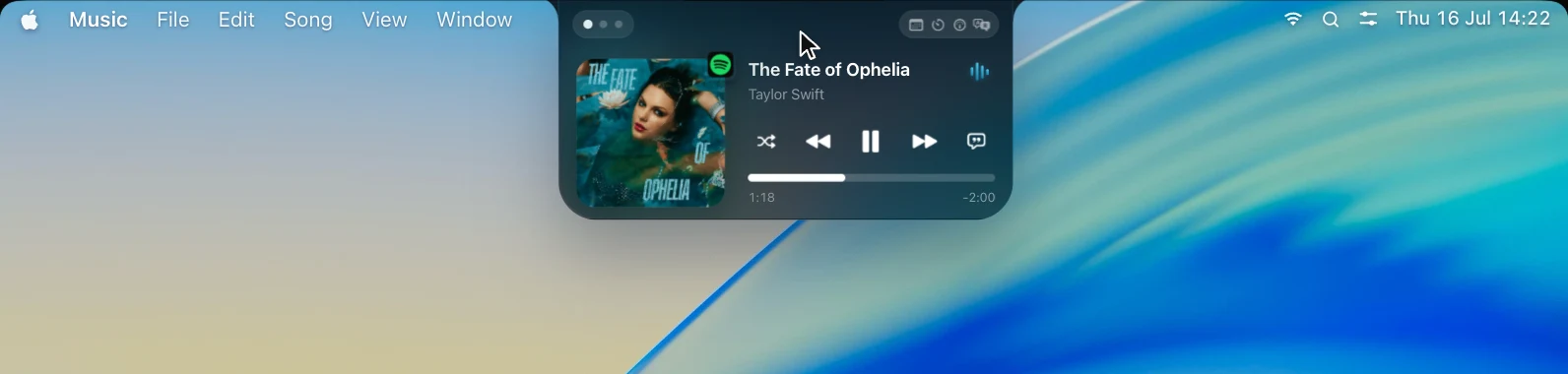
And OneNotch is in an even harder position than most, because it isn't a typical notch app. It's not just a media widget with an animated waveform. It's also a full clipboard manager — history, boards, Copy Stack, OCR — and a live AI agent monitor tracking Claude and Codex sessions in real time, all running from the same notch. Three apps' worth of functionality, in the one spot on your screen that's never allowed to cost anything.
Update, September 30, 2026. The campaign described below ran in July and August on the 1.x builds, and its results are kept here as they were. OneNotch 2.0 shipped today with a lot more inside it: Pill mode, Smart File Actions, Snap Zones, a Focus Timer, a rebuilt Clipboard Library and a new AI usage page. With all of that in the app, a current build idles at roughly 7–10% CPU and about 200MB of memory, higher than the ~0% and 95–130MB we measured in July. The memory figure is close to the floor for this kind of app: a native SwiftUI app that keeps a clipboard history typically sits at 100–200MB before it does much. The 2.0 column in the table is a rough reading from a current build, not a full re-run of the campaign, so please check it on your own Mac with the two-minute test at the end of this post.
This summer, we decided to find out whether OneNotch was part of the problem. We pointed Apple's own profiling tools at our shipping build and measured it the way a skeptical user would.
We did not like what we found.
The uncomfortable numbers
Here's what OneNotch 1.1.0 — the version many of you were running at the time — actually measured on our test machines:
- Around 30% of a CPU core, sustained, while music was playing. Not during interaction. Just… playing music, with the little animated waveform in the notch.
- An Energy Impact of 33.6 in Activity Monitor. For reference, an idle Chrome tab on the same machine measured 1.5.
- A slow memory leak: roughly 14,600 small objects accumulated over two hours of normal use. Individually tiny. Collectively, the kind of thing that makes an app feel worse the longer it runs.
- Memory spikes up to ~500MB for users with very large clipboard histories.
None of this made OneNotch unusable. Most users never noticed. That's precisely the trap notch apps fall into: the cost is invisible until someone checks their battery graph and starts wondering why.
We were not okay shipping that. So we spent the following weeks doing almost nothing else.
The rule we set
Before touching a line of code, we wrote down one rule:
An app that lives on your screen all day must cost as little as it possibly can whenever you're not actively using it.
Not "reasonable for what it does." As close to nothing as we can get. If OneNotch is sitting in your notch and you're writing an email, it has no business appearing anywhere near the top of Activity Monitor. The only acceptable trade is this one: when a feature does real, visible work — and only then — it may spend real energy, and it must stop the instant the work is done.
That rule sounds obvious. Almost no notch app on the market survives it — and most of them only have to animate a music player. We set out to hold a clipboard manager, an AI agent monitor, and a media hub to that standard simultaneously.
How we hunted
We didn't guess. We measured — obsessively, and on real workloads rather than synthetic benchmarks.
- We ran a multi-day measurement campaign: a logger sampling CPU, memory, energy impact, and CPU wakeups every 60 seconds across full workdays and overnight, while the app did everything it really does at once — music playing for hours, the clipboard capturing a full day of copied text, code, and images, and AI agent sessions running with live status in the notch.
- We used Apple's
powermetrics, the same low-level tool Apple's own engineers use, to get per-process energy figures that Activity Monitor only approximates. - We ran leak detection after five-hour sessions, not five-minute ones, because slow leaks hide from short tests.
- We measured Release builds installed in /Applications — debug builds lie, sometimes by 5–10x.
- We learned to distrust single snapshots. (At one point an overnight number looked terrible; it turned out a screen-sharing tool was forcing the whole system to render continuously. Measurement is a skill.)
The campaign surfaced around twenty distinct inefficiencies across six different subsystems of the app. Some were dramatic — work being performed at full speed that no human being could possibly see. Some were subtle — the CPU being woken from sleep ten times more often than the task required. One was that leak, dripping thousands of objects an hour from a single misplaced assumption.
We fixed all of them.
What we're not going to tell you
Here's the part where a normal engineering blog would walk through each fix with code snippets.
We're not going to do that, and we'd rather be honest about why: the fix list is a competitive advantage. There are a lot of notch apps out there. Most of them have some version of the problems we just described — the category's battery-drain reputation didn't come from nowhere. The weeks we spent finding and eliminating these costs are part of what you're buying when you choose OneNotch, and we're not going to hand our homework to apps that haven't done theirs.
What we will hand you is the thing that can't be faked: the numbers. Every figure below is reproducible by anyone with Activity Monitor and ten minutes. We encourage you to check — and to check the other apps on your Mac while you're at it.
The results
Same machine, same workloads, Release builds, measured with the same tools:
| Scenario | OneNotch 1.1.0 | After the optimization work (July–August, 1.x) | OneNotch 2.0 (September 30, rough) |
|---|---|---|---|
| Playing music (default waveform) | 26–40% CPU | under 1% CPU | not re-measured |
| Live audio visualizer (opt-in) | ~30% CPU | 6–9% CPU | not re-measured |
| Idle in the notch | could get stuck at 20–30% after visiting Settings | ~0% | about 7–10% CPU |
| Energy Impact (music playing) | 33.6 | single digits, near zero when idle | not re-measured |
| Memory after 8 hours | spikes toward 500MB | 95–130MB, completely flat | about 200MB |
| Leaked objects | ~14,600 in 2 hours | 24 in 5 hours | not re-measured |
| CPU wakeups, idle | — | ~8 per second | not re-measured |
Here is what the July build looked like in the one place everyone can check — Activity Monitor, sorted by CPU:
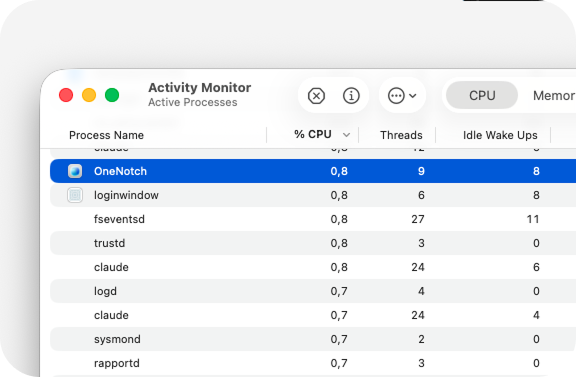
In that July build, OneNotch is the highlighted row. Notice what it is sitting between: loginwindow, fseventsd, trustd, logd — macOS's own background daemons, the processes that are simply part of your Mac running. That is the company a notch app should keep. At 8 idle wake-ups it is barely asking the CPU to wake up at all, which is what actually decides battery life on a laptop.
A few of the table entries deserve translation from benchmark-speak:
"Under 1% while playing music" means the animated waveform in your notch now costs less than the menu bar clock. In powermetrics, OneNotch ranks below macOS's own window compositor while music plays.
"Flat memory over 8 hours" means we let it run overnight with music looping — clipboard history loaded, agent monitoring armed — and watched the graph. It's a horizontal line.
"24 leaked objects in 5 hours" is 1.3 kilobytes. The previous build leaked more than that every four seconds.
The trade-offs we kept — on purpose
Honesty requires saying what still costs something, and why we think that's correct:
- The live audio visualizer — the waveform that dances to the actual audio on your Mac — costs 6–9% of a core while active. It's analyzing real sound in real time; that's genuine work, not waste. It's opt-in, and the default waveform (under 1%) looks great without it.
- A few animations now run at framerates chosen for the human eye rather than for spec sheets. If you can spot the difference without a high-speed camera, we'll be impressed.
- When you actively open the notch and scroll through your clipboard history, CPU briefly spikes. It's rendering rich previews of hundreds of items at your command, and it goes back to ~0% the moment you're done. Same for AI agent tracking: the notch updates when your agent's status actually changes, not on a timer that burns your battery to poll for nothing. That's the rule working as intended: energy in exchange for visible work, and only then.
Why this matters more than any feature
Features are easy to compare on a website. Efficiency only shows up three weeks later, in your battery graph and your fan noise — long after the purchase decision.
We think that's backwards. The notch is permanent screen real estate; whatever lives there should be held to the standard of the menu bar clock, not the standard of "well, it's a whole app." And that standard shouldn't loosen just because the app does more. OneNotch gives you a clipboard manager you'd otherwise pay for separately, AI agent monitoring that few other notch apps offer, and a polished media hub — and the deal is that all of it, combined, stays as light as we can make it. That's the bar we're now holding every future OneNotch feature to, and the measurement rig we built for this campaign runs on every release from here on.
If you're evaluating any notch app — ours included — do this: open Activity Monitor, click the CPU tab, play some music, and just watch for two minutes. Then check the Energy tab. The apps that respect your battery are immediately obvious.
Judge for yourself.
Download OneNotch for free — the fastest way to check our numbers is on your own Mac.