If you're looking to make your MacBook notch do more than just sit there, you've probably narrowed your choices down to a few apps. Two of the most interesting options in 2026 are OneNotch and Alcove. Both aim to bring a Dynamic Island-like experience to your Mac, but they take very different approaches to how you should interact with your screen's edge.
Here is a breakdown of what each app does best, and why OneNotch might be the ultimate upgrade for your productivity.
What Alcove does well
Alcove is a beautiful app that leans heavily into the pure iOS Dynamic Island aesthetic. It focuses primarily on Live Activities and Widgets:
- Real-time updates: It replaces standard macOS HUDs (volume, brightness) with sleek, notch-centered animations.
- Lock-screen presence: Alcove is one of the few apps that extends its widgets to the Mac lock screen.
- Swipe gestures: It supports swiping on the notch to switch between different active tasks.
- Customizable HUDs and a native build: It is written in Swift and sized for speed, and it asks for a one-time $14.99 after a short free trial.
If your only goal is to make your Mac feel more like your iPhone, Alcove does a fantastic job of polishing the visual experience.
Where OneNotch takes the lead
While Alcove focuses on visuals, OneNotch is built for pure, unadulterated productivity. It doesn't just show you information; it actively helps you work faster, while keeping your Mac running cool.
Here is where OneNotch shines:
1. Deep Core Optimization, With Published Numbers
A notch app runs all day, which means performance is not a nice-to-have. Alcove is a native Swift app and is genuinely light — credit where it is due. But Alcove is media and Live Activities; OneNotch also carries a full clipboard manager and live AI-agent monitoring on the same notch, so we held it to a harsher standard.
So we profiled our own app with Apple's powermetrics, ran leak detection over multi-hour sessions, and logged energy across full workdays and overnight. Where it stands today, with the clipboard, agents and media all running:
- Quiet in the background while the notch sits idle
- Frugal with memory: it lets go of memory it does not need
- Light during music playback with the default waveform; only the opt-in live visualizer costs noticeably more
We published the method and what we found so you can check it yourself in Activity Monitor.
2. Live Activities That Hold Their Own
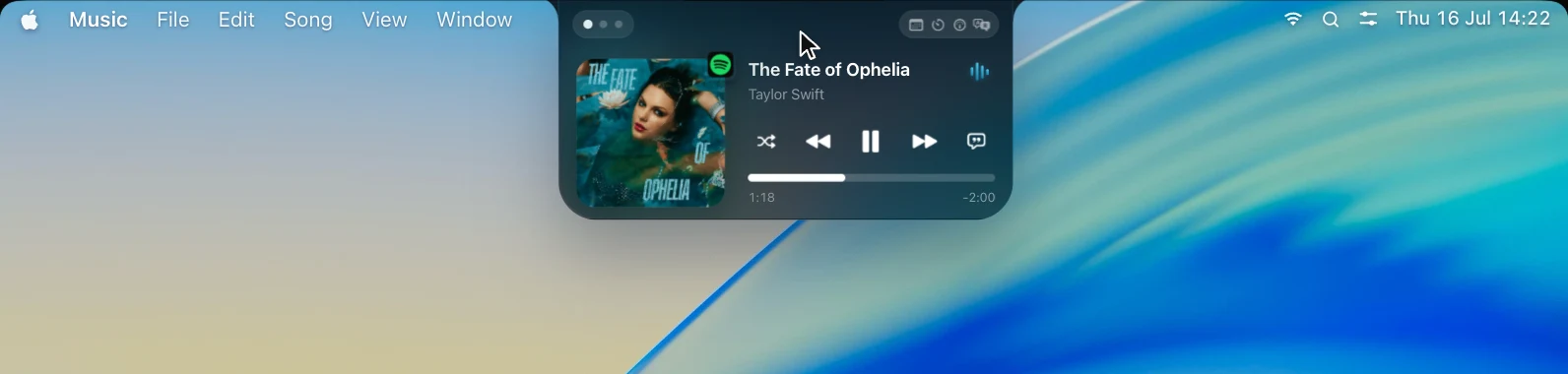
Alcove's strength is polish, and OneNotch does not leave that ground empty. It replaces the volume and brightness HUDs, shows charging and battery alerts, Bluetooth connections, Caps Lock, a no-internet warning and your next meeting with a one-click Join button, and keeps a Focus Timer running in the notch even when it is closed. Apple Music lyrics scroll word by word, like karaoke, and there is a lock-screen player too. Version 2.1.0 adds free tools beside the notch: Keep Awake, a Sound page with per-app volume, System Monitor, Cleaning Mode, a Presenter teleprompter, and an Eye Break reminder that follows the 20-20-20 rule.
3. A True Power-User Clipboard
OneNotch isn't just a notch app; it's a full-fledged clipboard manager.
- Copy Stack: Double-press ⌘ to collect multiple clips, then paste them in order.
- Boards: Save snippets you use daily and paste them with simple
⌘1,⌘2shortcuts. - Cursor Panel: The clipboard doesn't just live on the notch; it can pop up right at your cursor, saving you endless trips to the menu bar.
4. AI Agent Integration
This is where OneNotch stands almost alone. If you use AI coding agents like Codex or Claude, OneNotch puts their status right on your notch. You can see live API responses, quota usage, approval requests, and running tasks without ever breaking your focus or babysitting a terminal window.
5. A Fraction of the Price
Alcove charges a $14.99 one-time fee, which is reasonable for its polish, and it has no free tier beyond a short trial. OneNotch offers a genuinely useful Free tier, and the lifetime Pro upgrade is $9.99 lifetime, or $6.99 with code LAUNCH30. For less money, you get a clipboard manager, AI agent tracker, media controls, Live Activities, and file actions all in one.
Quick Comparison
| Feature | OneNotch | Alcove |
|---|---|---|
| Primary Focus | Productivity, Clipboard, AI | Aesthetics, Live Activities |
| CPU/Battery Optimization | Light; releases memory when idle (profiling write-up published) | Native Swift, light |
| Clipboard Manager | Yes (Copy Stack, OCR, Boards) | No |
| AI Agent Status | Yes | No |
| Live Activities | Yes (charging, Bluetooth, Focus Timer, meetings and more) | Yes, its core focus |
| Lock Screen Widgets | Yes | Yes |
| Files and windows | File Actions, Snap Zones | Not its focus |
| Notch tools | Keep Awake, Sound mixer, System Monitor, Cleaning Mode, Presenter, Eye Break (2.1.0) | Not a listed feature |
| Price | Free / Pro $9.99 lifetime, or $6.99 with code LAUNCH30 | $14.99 one-time after a short trial |
The Verdict
If you want your Mac to feel exactly like an iPhone with fluid lock-screen widgets and swipe gestures, Alcove is a great piece of software.
But if you want your notch to actually save you time, OneNotch is the clear winner. It combines an elite clipboard manager, AI agent tracking, file actions, and media controls — and keeps its idle cost modest, at a lower price. That is a strong return on the top of your screen.
Download OneNotch for free today and see how much faster you can work.