The MacBook notch has evolved from a controversial design choice into prime real estate for software innovation. In 2026, if you want to turn that notch into an interactive "Dynamic Island," two heavyweights dominate the conversation: NotchNook and OneNotch.
Both apps are ambitious, transforming the top of your screen into a hub of activity. However, they are built for entirely different types of workflows. Here is a breakdown of how they compare.
NotchNook: The File Shelf
NotchNook is a broad, feature-rich dashboard that acts as a mini-desktop extension. Its flagship feature is its File Tray.
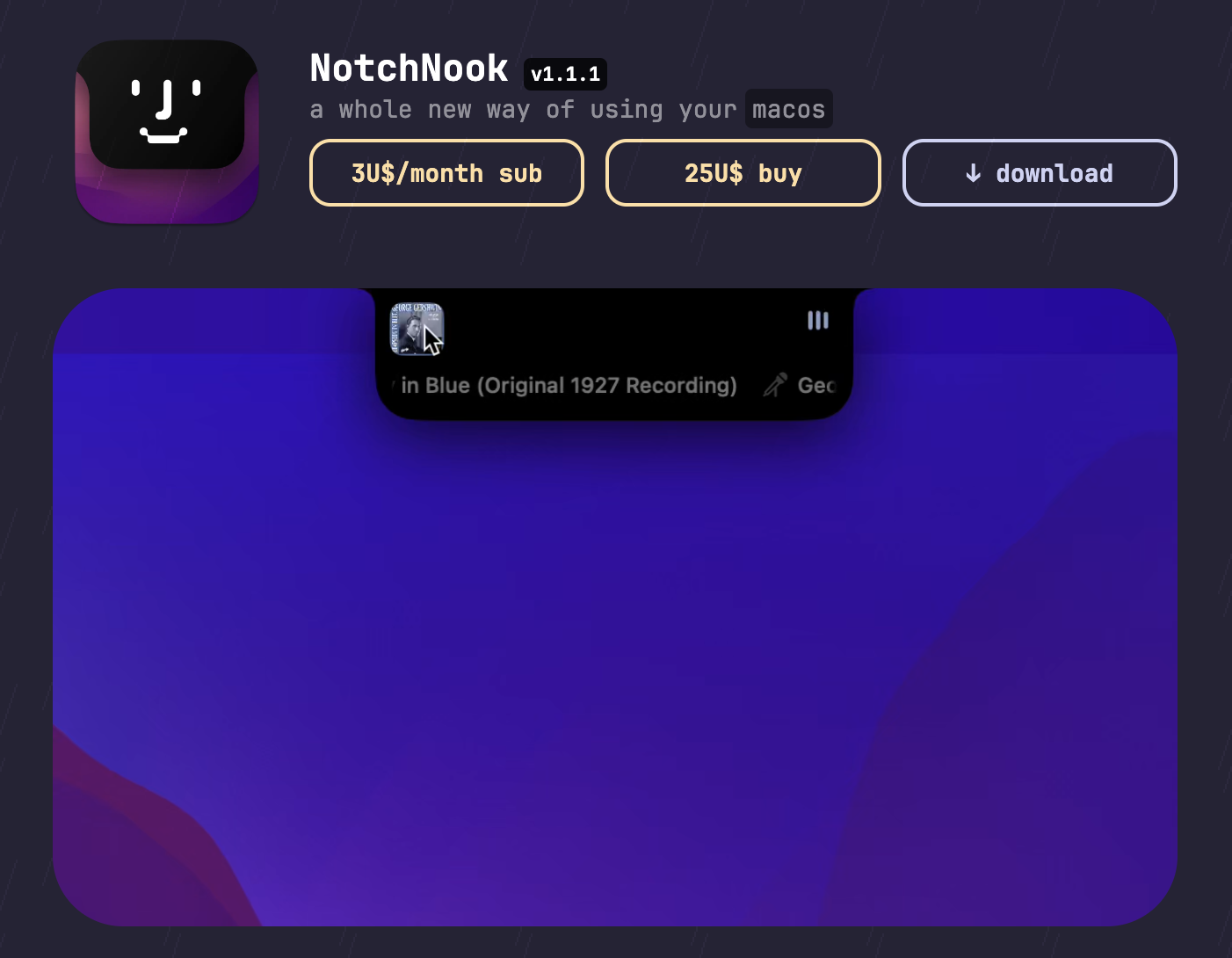
- Drag and Drop: You can drag files, images, and downloads into the notch, and NotchNook holds them in a temporary shelf.
- Widgets: It features a customizable "Nook" that drops down to show media controls, calendar events, and even a webcam mirror.
- AirDrop drop box: Drop a file on the AirDrop target in the tray to send it without opening Finder.
- Shortcuts, timers and a webcam mirror: Run Shortcuts from the notch, keep a timer or to-do list, and check your camera before a call.
- Customization: It offers a highly modular interface that appeals to users who love tweaking their setup.
- Track record: It is the longest-established paid notch app, and the one-time license covers five Macs.
If your primary pain point is moving files between full-screen apps and you want a temporary drop-zone at the top of your screen, NotchNook is designed exactly for that.
OneNotch: The Performance-Driven Productivity Hub
While NotchNook focuses on file management, OneNotch is laser-focused on text, code, files you want to act on, and sheer performance. It is designed for power users, developers, and writers who need speed and efficiency without sacrificing their Mac's battery life.
1. Extreme Performance and Battery Optimization
Notch apps have a battery-drain reputation, and heavy animations plus constant file handling are exactly how apps earn it. OneNotch went the other way. We spent weeks profiling our own app with Apple's own tools — powermetrics, leak detection over multi-hour sessions, energy logging across full workdays and overnight — and rebuilt whatever failed the bar.
Where it stands today on a Release build anyone can verify in Activity Monitor:
- Roughly 7–10% CPU when idle in the notch
- About 200MB of memory, which is typical for a native SwiftUI app that keeps a clipboard history
- Under 1% CPU while music played with the default waveform, in our July testing of the 1.x builds
That is with the whole app running — clipboard manager, AI-agent monitoring, and media hub together. A native SwiftUI app that keeps a history sits at 100–200MB before it does much, so about 200MB is close to the floor for this kind of app. We wrote up the full campaign, including the numbers we were not proud of, in Do Mac notch apps drain your battery?.
2. A World-Class Clipboard Manager
Instead of a file shelf, OneNotch integrates a professional-grade clipboard manager into the notch.
- Copy Stack: Double-press ⌘ to queue up multiple copied items, then paste them one by one in order.
- Smart Boards: Save frequently used snippets, templates, or code blocks.
- Cursor Panel: OneNotch doesn't force you to go to the notch; you can summon its clipboard panel right at your mouse cursor.
- Go to Source & Text Tools: It remembers the exact web page you copied text from, offers 15 built-in transform tools (like uppercase and JSON), and lets you search Google for any clipboard item instantly without pasting.
- Floating Lyrics: Media controls are enhanced with a resizable, draggable lyrics panel that stays on top anywhere on your screen.
OneNotch also handles files, just differently. Since version 2.0 (September 30, 2026), Smart File Actions let you drag a file onto the notch and pick what to do with it: resize, convert or compress an image, remove its background, run OCR, turn a video into MP4 or pull out its audio, merge PDFs, unzip an archive, or AirDrop it. The result is saved next to the original and a progress ring stays visible even when the notch is closed. There is no shelf that keeps files parked there, so if a holding area is what you want, NotchNook is still the better fit.
Version 2.0 also added Snap Zones (drag a window up to the notch to tile it), a Focus Timer that keeps counting down when the notch is closed, and Pill mode, so OneNotch runs on Macs without a notch too.
3. Built for the AI Era
If you use AI tools, OneNotch is hard to beat. It is one of the few notch apps that shows live status for AI agents like Claude and Codex, and NotchNook is not one of them. You can track running tasks, see cost, tokens and quota windows on a dedicated usage page, and approve agent actions right from the notch, eliminating the need to constantly check terminal logs.
4. Honest, Affordable Pricing
NotchNook is priced at $25 for a lifetime license (five Macs) or $3/month on subscription (two Macs).
OneNotch believes essential tools should be affordable. We offer a highly functional Free tier, and Pro is a one-time purchase at $9.99 lifetime, or $6.99 with code LAUNCH30, covering two Macs. No subscriptions, no hidden fees.
Quick Comparison
| Feature | OneNotch | NotchNook |
|---|---|---|
| Core Feature | Clipboard Manager & AI Agents | File Shelf & Drop Zone |
| Resource Efficiency | Measured and published: about 7–10% CPU idle, about 200MB | Not published; check Activity Monitor |
| Files | File Actions (resize, convert, compress, remove background, OCR, merge PDFs); no persistent shelf | File tray with AirDrop drop box |
| Clipboard Tools | Advanced (Copy Stack, OCR, Boards, Source Tracking, 15 Text Tools) | Not a focus |
| Media Controls | Advanced (with Floating Lyrics Panel) | Basic |
| AI Agent Tracking | Yes | No |
| Windows and focus | Snap Zones, Focus Timer | Shortcuts, timers, webcam mirror |
| Price | Free / Pro $9.99 lifetime, or $6.99 with code LAUNCH30 | $3/mo (2 Macs) or $25 lifetime (5 Macs) |
Which App Wins?
If you are a designer or someone who constantly drags files between Finder windows and apps, NotchNook's file shelf is a fantastic tool that justifies its higher price tag.
However, if you work with text, code, or AI, OneNotch is the superior choice. Its elite clipboard manager saves you thousands of keystrokes a week, the AI agent integration keeps you in flow, and the deep core optimizations guarantee your Mac stays cool and fast. Combine that with a one-time Pro price ($9.99 lifetime, or $6.99 with code LAUNCH30) and OneNotch is the smartest investment for your digital workspace.
Try OneNotch for free today and experience a faster, lighter Mac.