When Apple first introduced the notch to the MacBook Pro, the community was split. Some people didn't mind it, while others found it visually distracting. This divide led to the creation of two very different types of apps: those that try to hide the notch, and those that try to make it useful.
TopNotch is the king of hiding it. OneNotch is the king of using it. Here is how to decide which approach is right for you.
TopNotch: The Eraser
TopNotch has one single, simple job: it makes your macOS menu bar completely black.
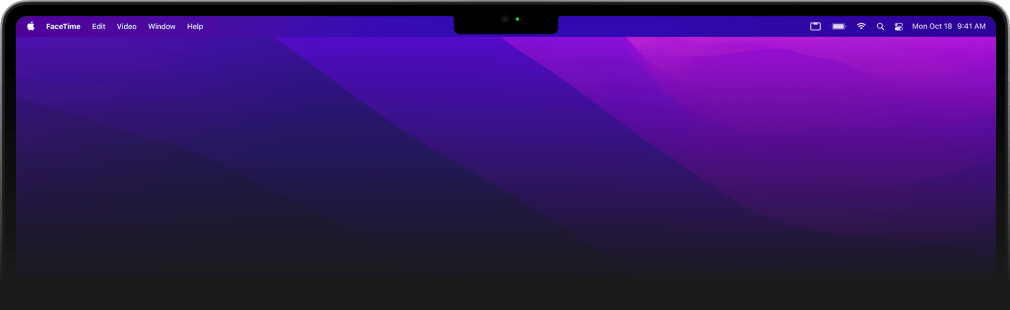
Because MacBooks use MiniLED displays, rendering a pitch-black menu bar effectively blends the physical notch into the screen, making it practically invisible. It's a fantastic, free cosmetic utility that does exactly what it promises.
It is tiny and does not ask for anything: it is free, runs on macOS 11 and later, launches at login, handles multiple displays, and can round the screen corners. It works by drawing a click-through black strip over the menu bar, so it costs almost nothing to run.
If looking at the camera cutout actively bothers you, and you want your screen to look like a perfect rectangle again, TopNotch is the app for you.
OneNotch: The Utility Belt
OneNotch takes the opposite approach. If the notch has to be there, why not give it a job?
Instead of hiding the cutout, OneNotch wraps a powerful, interactive dashboard around it. It turns dead space into the most productive part of your screen.
Here is why you might want to embrace the notch instead of hiding it:
1. Modest Resource Usage
The obvious fear: TopNotch is a static black bar that costs nothing, so surely a whole dashboard — clipboard manager, AI-agent monitoring, media controls — will cost your battery?
We had the same worry, so we measured it properly with Apple's own profiling tools instead of guessing. On a Release build today:
- Roughly 7–10% CPU when idle in the notch
- About 200MB of memory, which is typical for a native SwiftUI app that keeps a clipboard history
- Under 1% CPU while music played with the default waveform, in our July testing of the 1.x builds
A cosmetic black bar will always cost less than a dashboard, but the idle cost of the full OneNotch dashboard is modest, and the cost appears only when the notch is doing visible work. The full measurement write-up is here, numbers we were not proud of included.
2. The Ultimate Clipboard Manager
Why travel to the corner of your screen to paste something? OneNotch stores your clipboard history right on the notch.
- Use Copy Stack to copy multiple items and paste them in sequential order.
- Organize text into Boards for easy access.
- Access a floating panel right at your cursor with a keyboard shortcut.
3. AI Agent Monitoring
For developers and power users, OneNotch shows AI coding agents like Codex and Claude right on the notch. You can monitor each session's last message and branch, task progress, token use and quota windows, and approve requests without switching to the terminal. It frees up your terminal windows and keeps you in the zone.
4. Media & Live Activities
OneNotch also handles Now Playing media controls, calendar previews, and iOS-style Live Activities, giving you all the benefits of a "Dynamic Island" without the bloat.
5. Files, Windows and Focus
Version 2.0 (September 30, 2026) turned the notch into a small workbench. Drag a file onto it to resize, convert, compress or OCR an image, remove a background, merge PDFs or unzip an archive with Smart File Actions. Drag a window up to it to tile it with Snap Zones. Start a Focus Timer that keeps counting when the notch is closed.
Which should you choose?
- Choose TopNotch if: You want a purely aesthetic fix. You don't need extra productivity tools; you just want the camera cutout to disappear, and you want it for free.
- Choose OneNotch if: You want to work faster. For a one-time lifetime purchase of Pro ($9.99 lifetime, or $6.99 with code
LAUNCH30), after a useful free tier, OneNotch turns an annoyance into a feature: a clipboard manager, an AI-agent monitor, file actions, and media controls in one, with a modest, measured idle cost. You keep your battery life and gain the workflow.
Ready to put your notch to work? Download OneNotch for free and transform how you use your Mac.