Maccy is the clipboard manager a lot of Mac users start with, and for good reason: it is free, open source, and does the basics really well. If you are reading this, you probably like Maccy but have started bumping into its edges. You want ordered paste, boards, OCR, a way to clean up what you copied, or a panel that does not live up in the menu bar.
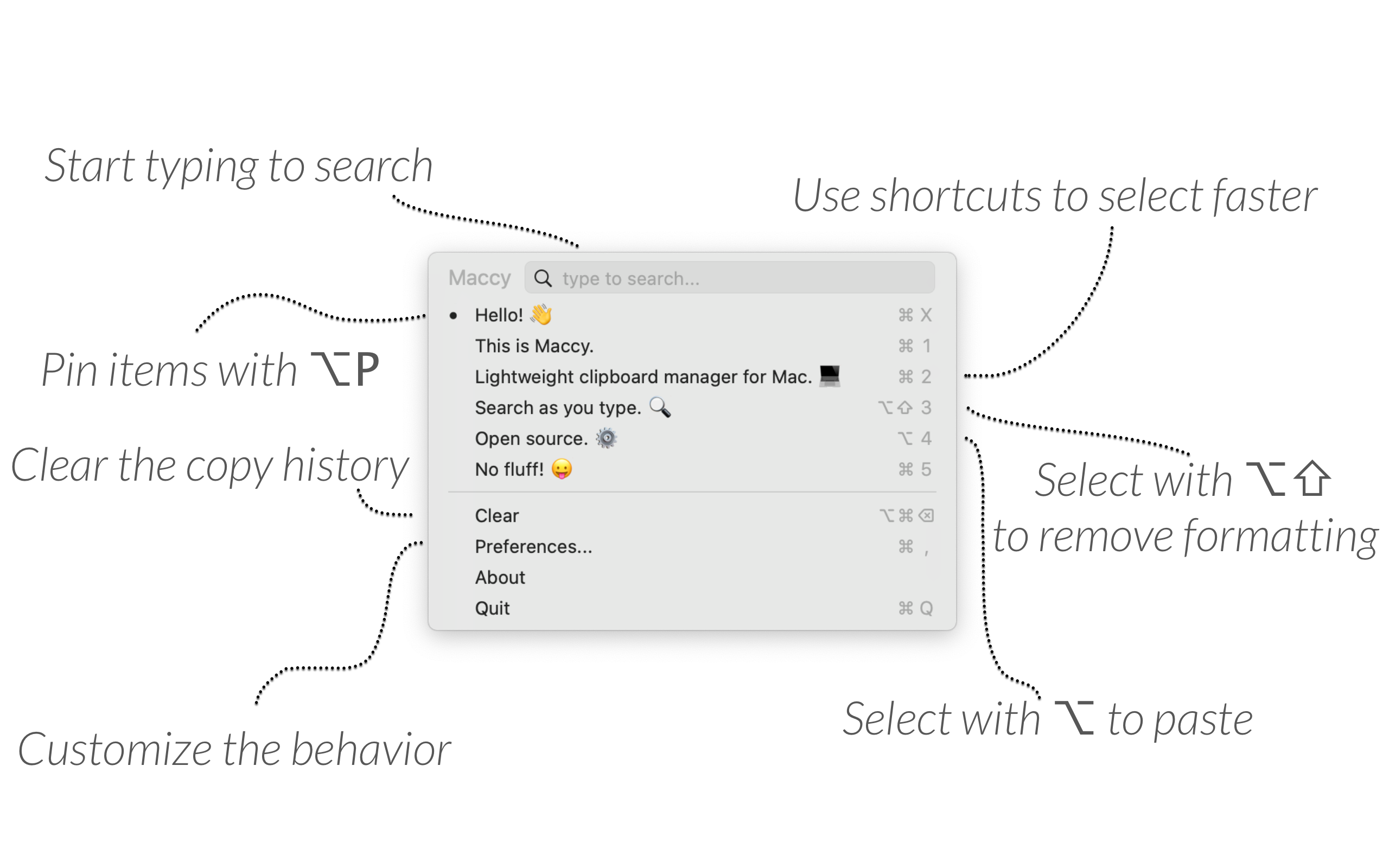
Quick disclosure: we make OneNotch. Maccy is genuinely good, so first here is where it is still the right call, then where OneNotch is the upgrade. OneNotch details are for version 2.0.3 (October 5, 2026).
Where Maccy is still the right call
Stay with Maccy if:
- You want a light, free-forever tool. Maccy is MIT open source and free on GitHub, with no paid tier at all (the $9.99 Mac App Store build is optional and only funds the developer).
- You are on an Intel Mac or an older macOS. Maccy runs on macOS 14 and later, on Intel and Apple Silicon. OneNotch requires macOS 15 on Apple Silicon.
- You never need more than a searchable menu-bar history. If a dropdown of recent copies is all you want, Maccy nails it.
- Open source is a requirement. You can read every line of Maccy. OneNotch is not open source.
Two reassurances either way. Both apps keep clipboard history on your Mac with no account, so switching never means giving up on-device history (OneNotch's iCloud sync is optional and Pro-only). And if you picked Maccy because it is light, keep that in mind: Maccy is a small menu-bar app, and an app that does less uses less. OneNotch does far more — clipboard, media, Live Activities, and AI-agent status — and we profile it with Apple's own tools so it stays quiet in the background and lets go of memory it does not need. The full write-up is here.
Where OneNotch is the upgrade
OneNotch makes sense once you have outgrown a menu-bar dropdown.
1. It opens where you are looking
Maccy opens a dropdown in the menu bar. OneNotch wraps your clipboard history around the MacBook notch and opens a panel right at your cursor with ⌘⇧C, so there is no mouse trip to the top corner. Arrow keys move, Return pastes, ⌘1 to ⌘9 paste the first nine items in view, and clicking a clip pastes it straight into the app you were using.
2. Search filters by type and by source app
Maccy has fast keyword search. OneNotch adds @ filters: @image, @link, @text, @color or @file to narrow by type, and any other @word, like @chrome or @safari, to narrow by the app you copied from. Combine them with keywords, so finding "the screenshot I took from Safari" is a few keystrokes.
3. Ordered paste with Copy Stack
Maccy has no sequential paste. In OneNotch, double-press ⌘ (or ⌥) to start a Copy Stack, keep copying as you work, then paste everything in order with ⌘V. The queue is numbered, the notch shows the next clip, and the stack is consumed as you paste. You can also multi-select clips and paste them as an ordered queue.
4. Boards for the snippets you reuse
Maccy offers pinning. OneNotch has boards: move a clip to a board from the right-click menu or drag it onto a board pill, give each board an icon, and paste its clips with ⌘1, ⌘2 and so on. Pins survive restarts and history cleanup. A board can be locked with a passcode and its contents encrypted, and that is free; with Pro, a locked board also opens with Touch ID or your Apple Watch (new in 2.1.0). Since 2.1.0 you can also give any clip a name that shows on its card and that search finds (right-click › Rename…, free).
5. Edit and transform text before you paste
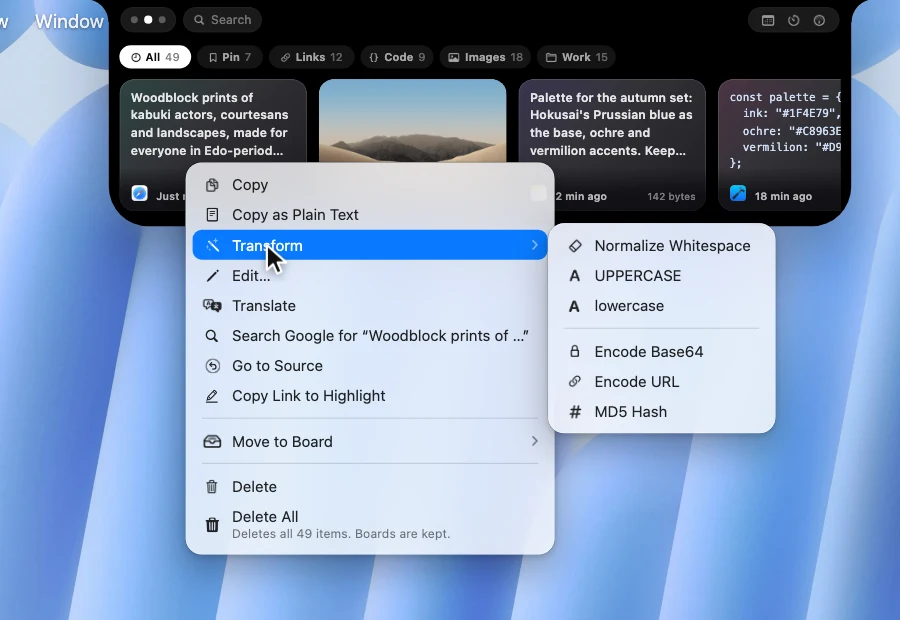
This is the gap people notice most after leaving a menu-bar manager. Right-click a text clip and choose Edit… to open it in its own window: trim whitespace, remove empty lines, join lines, change case, with undo and Revert, and since 2.1.0 sort lines, remove duplicates, strip Markdown symbols, remove tracking from links and remove accents. The Transform submenu adds 15 one-click actions: Normalize Whitespace (curly quotes, dashes and zero-width characters), UPPERCASE, lowercase, Format JSON, Minify JSON, Encode and Decode Base64, Encode and Decode URL, camelCase to snake_case and back, Timestamp to Date, MD5 Hash, Sort Lines and Remove Duplicate Lines. The result lands on your clipboard and the original stays in history.
6. Go to Source, Search Google and OCR
OneNotch remembers the web page you copied from. Go to Source reopens it, and for text it scrolls the browser to the copied passage and highlights it (Chrome, Safari and Firefox). Copy Link to Highlight gives you a shareable link to that passage, and Search Google looks up any copied text without pasting it first. For images there is built-in OCR to pull text out as editable text, plus Annotate and Translate Text in Image, and since 2.1.0 Resize and Convert to PNG, JPG, WebP or HEIC, copied as a new file.
7. It understands what you copied
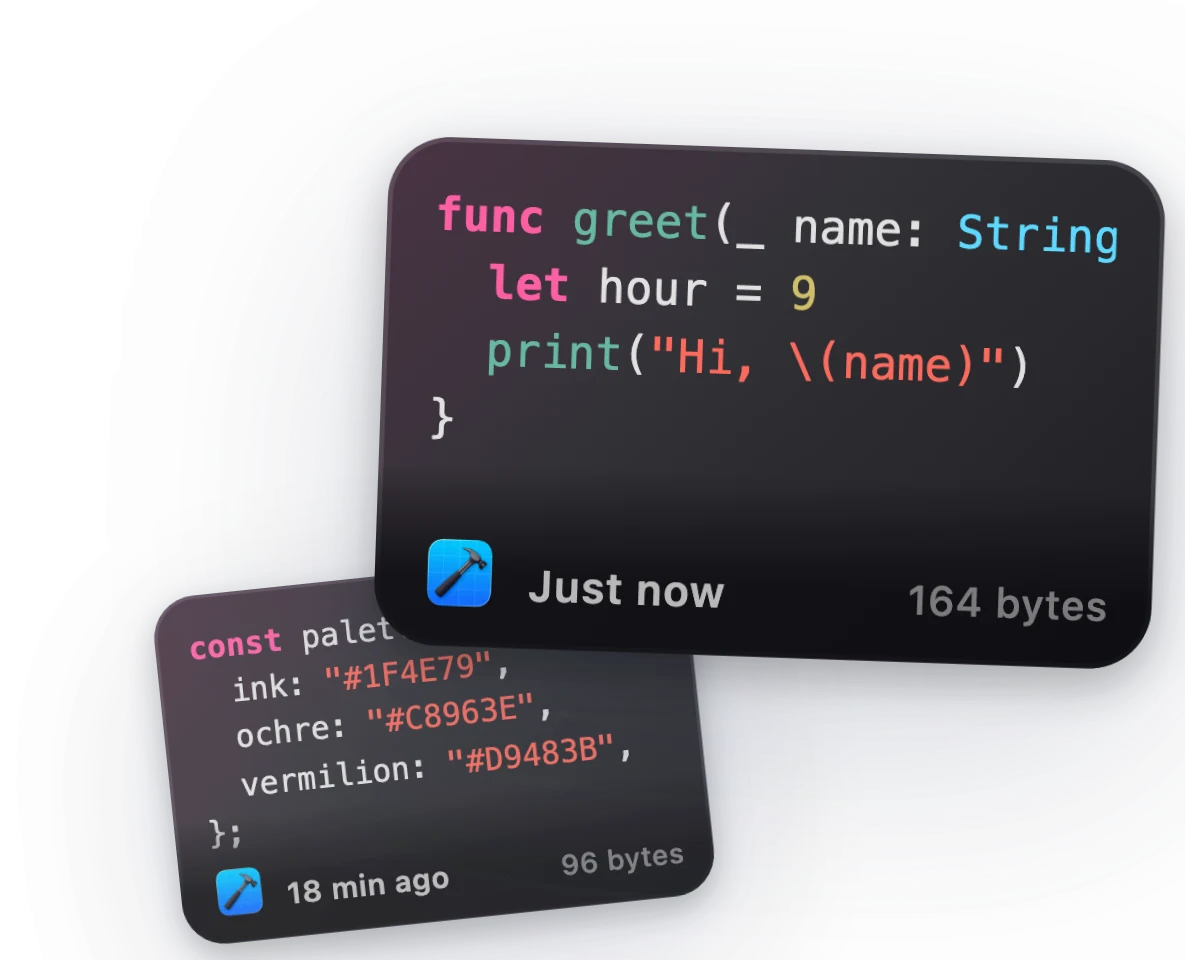
Code is detected and colored with Xcode and One Dark colors. Copy a hex, rgb() or hsl() value and you see a swatch. Links show the page title and lead image, and you also get SVG and file clips. Maccy keeps things simple; OneNotch shows each clip the way it deserves to look.
8. AI agents can search your clipboard
Turn on Clipboard MCP and Claude Code, Cursor and Codex can search your clipboard history, read the latest copy and put text back, so you never paste "the error I just copied" into a chat. It runs locally through a socket on your Mac, is off until you enable it, and lets you hide clips from password managers and chosen apps. Maccy has no AI agent access. See the Clipboard MCP setup guide for every tool and privacy control.
9. A real library, sync and backup
A rebuilt Clipboard Library shows your whole history in a full window, with a sidebar for types, source apps and boards, an inspector, and a viewer that zooms into any item and picks colors or extracts text from images. With Pro, iCloud sync keeps the same history on each of your Macs, and you can export everything to one .onenotchclip file and import it elsewhere.
10. More than a clipboard
Media controls with a resizable, draggable floating lyrics panel, Live Activities, your calendar, screenshots and AI-agent status live on the same notch.
Direct comparison
| Maccy | OneNotch | |
|---|---|---|
| Price | Free (open source) | Free · Pro $9.99 lifetime, or $6.99 with code LAUNCH30 |
| Open source | Yes (MIT) | No |
| Where it opens | Menu-bar dropdown | At your cursor and on the notch |
| Formats | History of what you copy | Text, links, colors, images, SVG, files, with code highlighting and link previews |
| Search | Fast keyword search | By type (@image, @link, @text, @color, @file) and source app (@chrome) plus keywords |
| Organization | Pinning | Boards with ⌘1–⌘9 paste, drag-and-drop pinning, optional passcode lock |
| Sequential paste | No | Copy Stack (double-press ⌘ or ⌥) and ordered multi-select |
| Edit before pasting | Paste without formatting | Edit window, cleanup tools and 15 transforms |
| OCR | No | Yes, plus Annotate and Translate Text in Image |
| Source tracking | No | Go to Source with a highlighted passage, Copy Link to Highlight |
| AI agent access (MCP) | No | Claude Code, Cursor, Codex and other clients, local and off by default |
| Sync between Macs | No | iCloud sync (Pro) |
| Beyond clipboard | No | Media (w/ floating lyrics), Live Activities, calendar, screenshots, AI agents |
| Idle resource use | Light | Light; releases memory when idle |
| Mac support | Intel and Apple Silicon, macOS 14+ | macOS 15+, Apple Silicon |
Price
Maccy is free. OneNotch has a free tier too (up to 50 clipboard items, 24 hours of history, and 1 board with 10 pins), and Pro is a one-time purchase at $9.99 lifetime, or $6.99 with code LAUNCH30, for up to 2 Macs, lifting the limits to 1,000 items, retention from a day to forever, and up to 20 boards with 200 pinned items each, and adding iCloud sync. Neither app charges a subscription.
Switching from Maccy to OneNotch
- Download OneNotch free, no account needed: download for Mac.
- Run it alongside Maccy for a few days.
- Keep whichever fits your workflow.
OneNotch does not import Maccy's history, so you start fresh. The active clips are usually what matter, but copy anything you rely on across before you switch.
Our take
If Maccy does everything you need, there is no reason to switch. It is a great free tool. But if you keep wishing for ordered paste, boards, OCR, text cleanup, or a panel at your cursor instead of the menu bar, that is exactly the gap OneNotch fills. For the wider field, see our clipboard manager comparison.
Frequently asked questions
Is there a Maccy alternative with more features?
Yes. OneNotch keeps Maccy's local, private spirit but adds Copy Stack ordered paste, boards, OCR, search by type and source app, an editor with 15 text transforms, Go to Source, and a panel that opens at your cursor or on the notch. It has a free tier and a one-time Pro upgrade at $9.99 lifetime, or $6.99 with code LAUNCH30.
Is OneNotch free like Maccy?
OneNotch has a free tier (up to 50 items, 24 hours of history, and 1 board with 10 pins). Maccy is fully free. OneNotch Pro is a one-time purchase at $9.99 lifetime, or $6.99 with code LAUNCH30, for higher limits and iCloud sync, and there is no subscription either way.
Is OneNotch private like Maccy?
Both keep clipboard history on your Mac with no account. Maccy is open source (MIT); OneNotch is not open source but is local-first: no account, anonymous usage data you can switch off, and an iCloud sync that is optional and Pro-only.
Does OneNotch work on Intel Macs or older macOS?
No. OneNotch requires macOS 15 or newer on Apple Silicon. If you are on an Intel Mac or an older macOS version, Maccy is the better fit.
Can I use my clipboard history with Claude Code or Cursor?
Yes, with OneNotch. Turn on Clipboard MCP in Settings and set up Claude Code, Cursor or Codex from the same page. The agent can then search and read your clipboard history, and optionally write text back. It is off by default, runs locally, and can hide clips from password managers and apps you choose. Maccy has no equivalent.
What does OneNotch have that Maccy does not?
Ordered paste via Copy Stack, boards with number-key paste and optional passcode locks, OCR, Go to Source tracking, text editing and 15 transform tools, instant Google search from the clipboard, code highlighting, rich previews for links, colors, SVG, and files, search by type and source app, a full Clipboard Library, a panel at your cursor and on the notch, iCloud sync between Macs with Pro, MCP access for AI agents, and extras like media controls with floating lyrics, Live Activities, and AI-agent status.