If you are here, it is probably because you like Paste but the subscription bothers you, or you are cancelling Setapp and want something standalone that does the same job, or close to it.
Quick disclosure: we make OneNotch, so of course we are going to recommend it. But first, here is what Paste genuinely does better, so you can decide with honest information. OneNotch details are for version 2.0.3 (October 5, 2026); Paste details are as of October 6, 2026, so check Paste's site for current pricing.
What Paste does better
Paste has earned its reputation, and a Mac-only app like OneNotch will not match it on everything:
- Sync across Mac, iPad, and iPhone. Copy a link on your iPhone and it is on your Mac a moment later. If you move clips between devices all day, this is genuinely useful.
- A mature iOS app and years of polish. Paste has been refined since 2015, and its design and animations are among the best in the category.
- The Apple ecosystem story. If your clipboard needs to live on every device you own, Paste is built around exactly that.
If you truly need your clipboard on an iPhone or iPad, stick with Paste. OneNotch Pro syncs history between your Macs through iCloud, but there is no OneNotch app for iPhone or iPad, and it is not going to grow one soon. That is the trade for an on-device, no-account design, and it is not a promise we are going to fake.
When OneNotch is the alternative
OneNotch makes sense if:
- You are done paying subscriptions. Paste is $29.99 a year, and it also sells a monthly plan and a one-time lifetime license. OneNotch Pro is a one-time purchase at $9.99 lifetime, or $6.99 with code
LAUNCH30, and covers up to 2 Macs. Against Paste's yearly plan you break even in a few months, and updates are free after that. - You do not need sync to a phone. Most people use a clipboard manager on a single Mac the vast majority of the time. If that is you, sync to an iPhone is a feature you rent every month without really using, and if you just want the same history on a second Mac, OneNotch Pro includes iCloud sync between Macs.
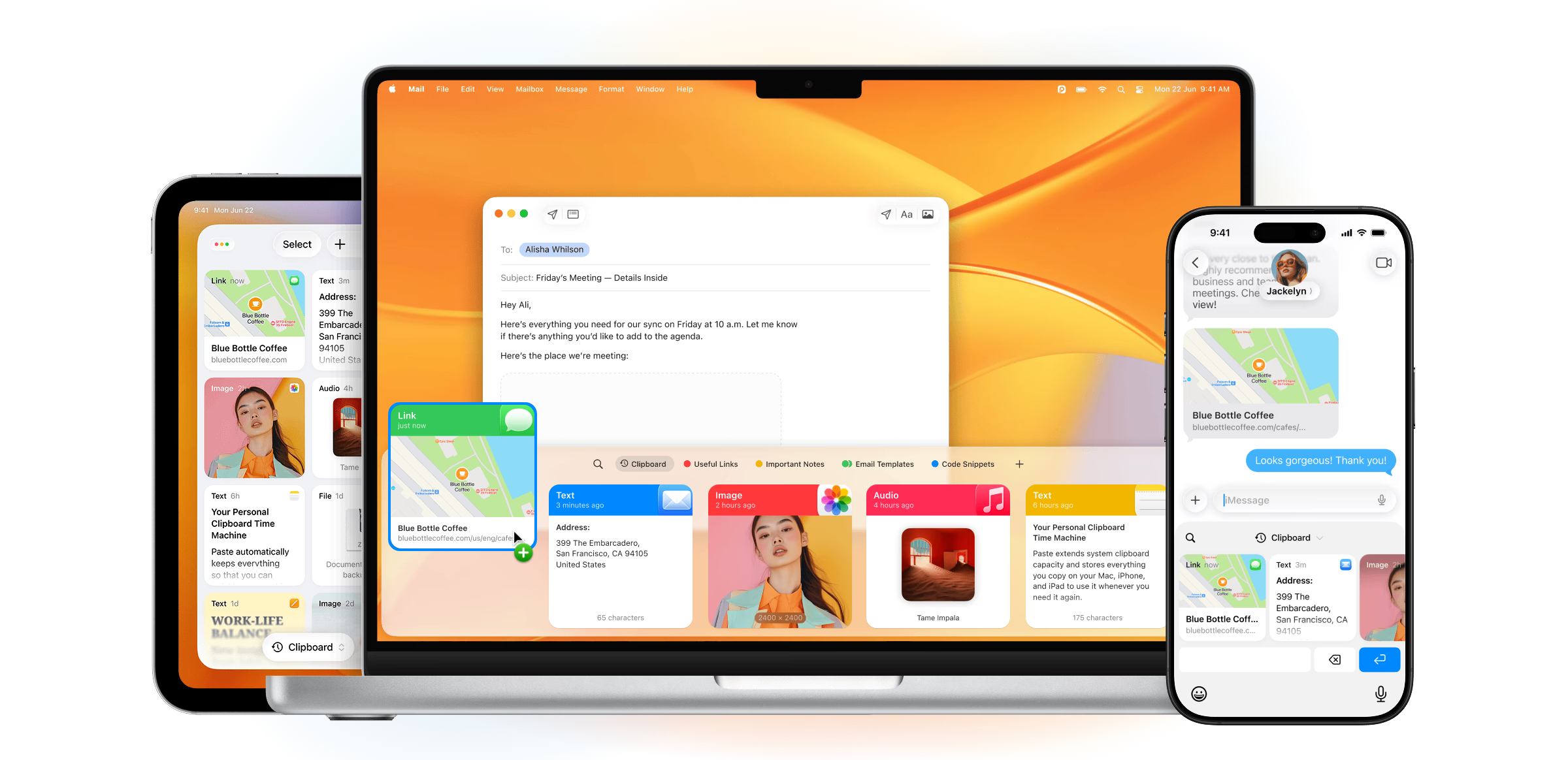
- Paste's fixed bottom panel bothers you. OneNotch opens a floating panel right at your cursor (press ⌘⇧C), and its history also lives on the notch you are already looking at, not in one predefined corner of one screen.
- You value privacy. OneNotch keeps history on your Mac by default and needs no OneNotch account. iCloud sync is optional and Pro-only: your clips go to your own private iCloud database, encrypted, and you choose whether images sync too. Paste syncs through your Apple Account by design.
- You want more than a clipboard. OneNotch also puts media controls, Live Activities, your calendar, screenshots and AI-agent status on the notch, so one app covers the whole edge of your screen. If clipboard depth is all you care about, see our clipboard manager comparison; if the notch is the draw, see the best Mac notch apps.
- You do not want to pay for it in battery. Doing more usually costs more, so we measured ours with Apple's own profiling tools and published the results: roughly 7–10% CPU at idle and about 200MB of memory, with clipboard, media, and agent monitoring all running. See the full write-up.
The idea behind OneNotch
OneNotch is meant to sit at the edge of your attention: appear the instant you need it, help, then quietly get out of the way. Your clipboard should be one glance or one keystroke away, right where your eyes already are, and then invisible again. That is the difference in feel from a panel that slides up from the bottom and asks to be looked at. Cursor, type, paste, gone.
What you get on the Paste features you use most
- Pinboards. OneNotch calls them boards. Move a clip to a board from the right-click menu or drag it onto a board pill, give each board an icon, and paste its clips with ⌘1 to ⌘9. Boards survive restarts and history cleanup, and any board can be locked with a passcode that encrypts its contents, free for everyone. Free has 1 board with 10 pins; Pro has up to 20 boards with 200 pins each.
- Paste Stack. OneNotch calls it Copy Stack. Double-press ⌘ (or ⌥) to start collecting, keep copying, then paste in order with ⌘V. You can also multi-select clips and paste them as an ordered queue.
- Search with filters. Type
@image,@link,@text,@coloror@fileto filter by type, or@chrometo filter by source app, then add keywords. - Quick, keyboard-only paste. Arrow keys and Return, ⌘1 to ⌘9 for the first nine items, or click a clip to paste it straight into the app you were using.
What OneNotch adds that Paste does not list
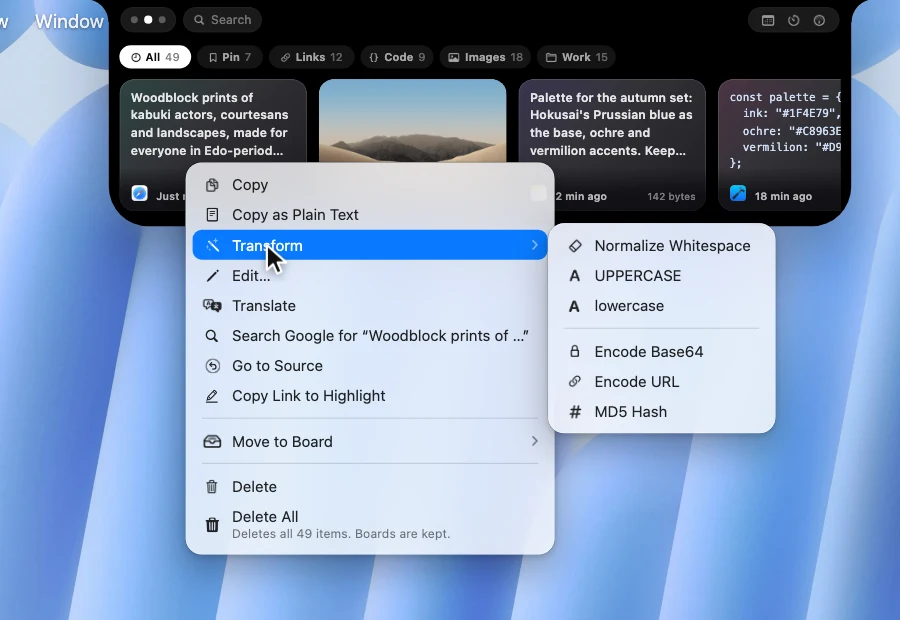
- Edit and transform text. Right-click a text clip and choose Edit… to trim whitespace, remove empty lines, join lines or change case in a window of its own. The Transform submenu adds 15 actions, including Format JSON, Minify JSON, Base64 and URL encode and decode, camelCase and snake_case conversion, Timestamp to Date, MD5 Hash, Sort Lines and Remove Duplicate Lines.
- Go to Source. OneNotch remembers the page you copied from, reopens it, and for text highlights the exact copied passage in Chrome, Safari and Firefox. Copy Link to Highlight gives you a link to share.
- Search Google for any copied text from the right-click menu, without pasting it first.
- OCR, Annotate and Translate Text in Image for images in your history.
- Code highlighting with Xcode and One Dark colors, color swatches for hex,
rgb()andhsl()values, and rich link previews. - A Clipboard Library window with a sidebar for types, source apps and boards, an inspector, and a zoomable viewer.
- Backup and import. Export your history and boards, images included, as one
.onenotchclipfile.
AI agents: both apps have an MCP server
Paste added MCP in 2026, so tools such as Claude, Codex and Cursor can search your Paste history and manage pinboards. OneNotch has an equivalent, called Clipboard MCP. Turn it on in Settings and agents like Claude Code, Cursor and Codex can search your history by text, type, source app and date, read the latest copy, write text back, and list, create and organize boards. It is off until you enable it, runs through a local socket on your Mac, and lets you hide clips from password managers and from chosen apps. Pins on a locked board are never shared, and agents cannot rename or delete boards. The setup guide covers the details.
So this is not a reason to leave Paste on its own. It is a reason you do not lose the AI workflow by leaving.
Where OneNotch shines in 2026
- You work across multiple displays. The floating panel appears at your cursor and the notch stays centered, so your mouse never travels to a bottom panel on another monitor.
- You work with AI across multiple terminals. OneNotch keeps Codex and Claude status on the notch and pairs it with a real clipboard. Copy output in one terminal, paste it in another, and use Copy Stack to move several fragments in order.
- You fill forms or move data between apps. Copy Stack lets you collect clips as you go, then paste them in order with a single ⌘V.
- You work with screenshots. Built-in OCR pulls text straight out of a copied image so it is searchable and pasteable.
- You write and review code. Format JSON, decode Base64, convert a timestamp, or sort lines without opening a website.
- You want floating lyrics. Enjoy a resizable, draggable lyrics panel that stays on top while you work.
Direct comparison
| Paste | OneNotch | |
|---|---|---|
| Price | $29.99/yr (monthly and lifetime options) | Free · Pro $9.99 lifetime, or $6.99 with code LAUNCH30 |
| Model | Subscription (lifetime option) | One-time or free |
| Sync | Mac, iPad and iPhone | Between Macs with iCloud (Pro); no iPhone or iPad app |
| Account required | Apple Account for sync | No OneNotch account; iCloud only if you turn sync on |
| Privacy | iCloud sync | Local by default, optional encrypted iCloud sync |
| Panel position | Fixed bottom panel | At your cursor and on the notch |
| Search by type and app | Yes | Yes (@image, @link, @chrome and more) |
| Boards / folders | Pinboards | Boards (1 free, up to 20 on Pro), lockable with a passcode |
| Sequential paste | Paste Stack | Copy Stack (double-press ⌘ or ⌥) |
| Text editor and transforms | Not a listed feature | Edit window and 15 transforms |
| Source tracking | Not a listed feature | Go to Source with a highlighted passage |
| AI agent access (MCP) | Yes | Yes, Claude Code, Cursor, Codex and other clients |
| Beyond clipboard | Clipboard-focused | Media (w/ floating lyrics), Live Activities, calendar, screenshots, AI agents |
| Idle resource use | Not published | About 7–10% CPU and 200MB (measured and published) |
| Platforms | macOS, iOS, iPadOS | macOS only |
Honest price math
Paste:
- Annual: $29.99/year
- 5 years: about $150
- 10 years: about $300
- Or a one-time lifetime license, which costs several times OneNotch Pro
OneNotch Pro:
- $9.99 lifetime, or $6.99 with code
LAUNCH30once, for up to 2 Macs, with free updates
If you are never going to need sync to a phone, that $30 a year is functionality you pay for but do not use.
Switching from Paste to OneNotch
- Download OneNotch free, no account needed: download for Mac.
- Run it alongside Paste for a few days.
- If you do not miss the sync, cancel Paste.
OneNotch does not import Paste's history, so you start fresh. Most people do not miss the old history because the active clips are what matter, but if you rely on a specific one, copy it across manually before you cancel.
Frequently asked questions
Is there a Paste alternative for Mac without a subscription?
Yes. OneNotch is a native Mac clipboard manager with a free tier and a one-time Pro upgrade at $9.99 lifetime, or $6.99 with code LAUNCH30, that covers up to 2 Macs. There is no subscription. It opens a panel at your cursor and keeps history on the notch, with boards, search by type and source app, Copy Stack, OCR, Go to Source tracking, 15 text transform tools, instant Google search, and floating lyrics.
Does OneNotch sync between Mac and iPhone like Paste?
Not to a phone. OneNotch is Mac-only. OneNotch Pro can sync your history between Macs through your private iCloud database, with encrypted content and no OneNotch account, but there is no iPhone or iPad app. If syncing between Mac, iPad, and iPhone is essential to you, Paste is the better choice.
Is OneNotch cheaper than Paste?
Over time, yes. Paste is $29.99 a year, so roughly $150 over five years. OneNotch Pro is a one-time purchase at $9.99 lifetime, or $6.99 with code LAUNCH30, with free updates, so it pays for itself within months.
Does OneNotch work with Claude Code, Cursor and Codex like Paste MCP?
Yes. OneNotch includes Clipboard MCP: turn it on in Settings, set up Claude Code, Cursor or Codex, and the agent can search and read your clipboard history, write text back, and organize boards. It runs locally, is off by default, and can hide clips from password managers and chosen apps.
Can I import my Paste history into OneNotch?
Not automatically. OneNotch starts with a fresh history. If you depend on a specific clip, copy it across manually before cancelling Paste.
Is OneNotch private?
Yes. OneNotch stores clipboard history locally on your Mac by default, with no account and an app exclusion list for sensitive content. Anonymous usage data is optional: you choose during setup and can change it any time in Settings. If you turn on iCloud sync (Pro), clips go to your own private iCloud database, encrypted, and you choose whether images sync.