Developers copy and paste more than almost anyone: stack traces, shell commands, JSON responses, API keys, SQL, diffs, links to docs. A clipboard manager that only remembers text is a start. The ones worth using also show code as code, fix a payload before you paste it, find the thing you copied an hour ago, and, increasingly, let your AI coding agent look it up for you.
Quick disclosure: we make OneNotch. We rank the apps on what developers need, and say where OneNotch is not the right pick. OneNotch details are for version 2.0.3 (October 5, 2026); prices and features of other apps are accurate to the best of our knowledge as of October 6, 2026, so check each app's own site before you buy.
What developers need from a clipboard manager
- Code that looks like code. Syntax colors let you tell a snippet from a sentence in a long history.
- Search by type and source app. "That JSON from the browser" or "the command from Terminal" should be a couple of keystrokes.
- Transforms without a website. Format JSON, decode Base64, URL-encode a string, convert a timestamp, hash something, sort lines, without opening a browser tab.
- Clean paste. Curly quotes, dashes and invisible characters from docs and chat apps break code and shell commands.
- Snippets and pinned commands. The things you paste daily should be one keystroke away.
- Ordered paste. Moving several fragments between terminals, editors and tickets.
- Privacy. Your clipboard sees tokens and secrets. Look for an exclusion list, concealed-item handling, and local storage.
- Agent access. If you work with Claude Code, Cursor or Codex, a clipboard they can search saves a lot of pasting.
- Low overhead. It runs all day next to your editor, so check its CPU and memory use.
The best clipboard managers for developers on Mac
1. OneNotch: transforms, code colors and AI agent access
OneNotch keeps your clipboard history on the MacBook notch and opens a panel at your cursor with ⌘⇧C. It is not a developer-only tool, but several of its features are built for exactly this work.
It understands code. OneNotch detects what you copied from 23 formats, among them JSON, YAML, Markdown, XML, HTML, CSS, Swift, Objective-C, JavaScript, TypeScript, Python, Go, Rust, Java, Kotlin, C#, PHP, Ruby, SQL, shell scripts, Dockerfiles, .env files and diffs. It colors the preview with Xcode and One Dark colors, entirely on your Mac.
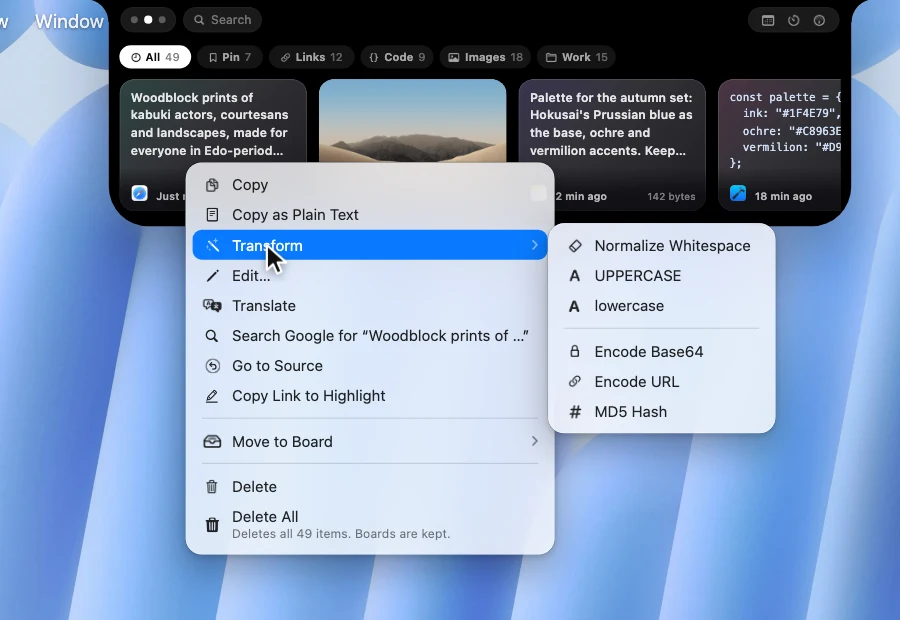
It transforms text in place. Right-click a text clip and open Transform. The options that make sense for the clip appear, and the result goes to your clipboard while the original stays in history:
- Format JSON and Minify JSON
- Encode and Decode Base64
- Encode and Decode URL
- camelCase to snake_case, and snake_case to camelCase
- Timestamp to Date (seconds or milliseconds)
- MD5 Hash
- Sort Lines and Remove Duplicate Lines
- UPPERCASE, lowercase and Normalize Whitespace, which straightens curly quotes and dashes, turns non-breaking spaces into normal spaces and strips zero-width characters, the usual cause of a command that looks right but fails
It edits before you paste. Edit… opens a clip in its own window, with a monospaced option, trim, join lines and remove empty lines, plus Revert and ⌘↩ to save.
It finds things. Type @link, @text, @image, @color or @file to filter by type, or @chrome, @safari or the name of any other app to filter by where you copied from, then add keywords. Search ignores case and accents.
It remembers where a snippet came from. Go to Source reopens the page you copied from, and for text it scrolls Chrome, Safari or Firefox to the copied passage and highlights it. Useful for getting back to the answer you copied a command from. Search Google runs a search for any copied text without pasting it first.
It queues pastes. Double-press ⌘, copy several things across terminals and editors, then paste them in order with ⌘V. See our guide on how to copy and paste multiple items on Mac.
It keeps your snippets. Pin the commands and snippets you use daily to boards and paste them with ⌘1 to ⌘9. Pins survive restarts and history cleanup, and a board can be locked with a passcode that encrypts its contents, free for everyone.
It talks to your AI agents. Turn on Clipboard MCP and Claude Code, Cursor and Codex can search your clipboard history, read the latest copy, write text back and organize boards, so "fix the error I just copied" works without pasting. It is off by default, local, and hides clips from password managers and apps you choose. The full guide is Clipboard MCP for Claude Code, Cursor and Codex.
Privacy that suits secrets. History stays on your Mac with no account. You can pause capture and add apps to an exclusion list, and there is an Ignore Sensitive Clipboard Content setting that skips items password managers mark as private (switch it on in Settings › Clipboard › Privacy). Optional iCloud sync between your Macs is a Pro feature.
Performance. OneNotch is native SwiftUI, and we publish measured numbers: roughly 7–10% CPU at idle and about 200MB of memory with clipboard, agents and media all running. The full write-up shows how we measured it. Maccy will always be lighter, since it does less.
What it does well:
- Syntax colors for 23 code and data formats
- Transform menu: JSON, Base64, URL, camelCase and snake_case, timestamps, MD5, sort and dedupe lines
- Edit window with monospaced text, cleanup tools and Revert
- Search by type and source app, 100% keyboard-driven, ⌘1 to ⌘9 quick paste
- Copy Stack and ordered multi-select paste
- Go to Source with a highlighted passage, and instant Google search
- Boards with passcode locks, MCP for Claude Code, Cursor and Codex
- Built-in OCR to pull text out of a screenshot of a stack trace or terminal
What it doesn't:
- macOS 15 or newer on Apple Silicon only, so no Intel Macs and nothing on Windows or Linux
- Not open source
- No iPhone or iPad app; iCloud sync only keeps your Macs in step
- A newer app with a shorter track record than Maccy or Alfred
Price: free (up to 50 items for 24 hours, and 1 board with 10 pins). Pro is a one-time purchase at $9.99 lifetime, or $6.99 with code LAUNCH30: up to 1,000 items kept as long as you like, 20 boards with 200 pins each, iCloud sync, and up to 2 Macs. No subscription.
For whom: developers on Apple Silicon who copy and paste constantly, work with JSON and encoded strings, run AI coding agents, and want it all in one native app for a one-time price.
2. Maccy: free, open source and light
Maccy is free and open source (MIT), very light, keyboard-first, and runs on macOS 14 and later, on Intel and Apple Silicon. It searches and pins clips and pastes without formatting. It has no transforms, boards, sequential paste or agent access, but if a fast history is all you want, it is excellent. See our Maccy alternative guide for when to move up.
3. Paste: polished, with sync and an MCP server
Paste is the polished subscription pick: pinboards, search with filters, a sequential Paste Stack and iCloud sync to iPhone and iPad. In 2026 it added its own MCP server, so Claude, Codex and Cursor can search your Paste history and manage pinboards. It is $29.99 a year, with a monthly plan and a lifetime option. See our Paste alternative comparison for the trade-offs.
4. Raycast and Alfred: if you already live in a launcher
Raycast and Alfred both include clipboard history alongside snippets, and both are strong if you already use them as your main launcher. Raycast's free tier limits clipboard retention and longer history needs Pro; Alfred's clipboard history needs the paid Powerpack. They are not a reason to adopt a launcher on their own, but they are a reason not to install anything else if you already have one.
5. macOS Spotlight clipboard history
On macOS 26 Tahoe, press ⌘-Space then ⌘-4 for a short built-in history. It is off until you enable it and keeps items for 30 minutes, 8 hours or 7 days, with no boards, transforms or sequential paste. See how it works in our guide to seeing clipboard history on Mac.
Comparison for developers
| OneNotch | Maccy | Paste | Raycast / Alfred | |
|---|---|---|---|---|
| Price | Free · Pro $9.99 lifetime, or $6.99 with code LAUNCH30 | Free (open source) | $29.99/yr (lifetime option) | Launcher; clipboard needs Pro or Powerpack for longer history |
| Code syntax colors | 23 formats | No | Not a listed feature | Not a listed feature |
| Transforms (JSON, Base64, URL, case, timestamps, hash) | 15 in the Transform menu | No | Not a listed feature | Not a listed feature |
| Search by type and source app | Yes | Keyword search | Yes | Search |
| Ordered paste | Copy Stack | No | Paste Stack | Not a listed feature |
| Boards or snippets | Boards, passcode locks | Pinning | Pinboards | Snippets |
| AI agent access (MCP) | Yes | No | Yes | Not a listed clipboard feature |
| Platforms | macOS 15+, Apple Silicon | macOS 14+ | Mac, iPhone, iPad | macOS |
How to choose
- You want transforms, code colors, search filters and agent access in one app, for a one-time price. OneNotch.
- You want free and open source. Maccy.
- You want sync to an iPhone and don't mind a subscription. Paste.
- You already use Raycast or Alfred. Use the clipboard history you already have.
- You only need the last few copies on Tahoe. The built-in Spotlight history.
Frequently asked questions
What is the best clipboard manager for developers on Mac?
For a Mac-only workflow, OneNotch combines syntax-colored code previews, a Transform menu for JSON, Base64, URL and case conversions, search by type and source app, Copy Stack, and an MCP server for Claude Code, Cursor and Codex. Maccy is the best free, open-source option, and Paste is the best choice if you need iPhone sync.
Which clipboard manager formats JSON?
OneNotch has Format JSON and Minify JSON in the Transform menu of any text clip that looks like JSON. The result goes to your clipboard and the original stays in history, so you do not need a JSON formatter website.
Can a clipboard manager decode Base64 or URL-encode a string?
OneNotch can. The Transform menu has Encode and Decode Base64 and Encode and Decode URL, and shows only the transforms that make sense for the selected clip.
Does any clipboard manager work with Claude Code or Cursor?
Yes. OneNotch and Paste both include an MCP server. In OneNotch, turn on Allow AI agents in Settings, install it for Claude Code, Cursor or Codex, and the agent can search your clipboard history, read clips, write text back and organize boards.
Will a clipboard manager save my passwords and API keys?
It can if you let it. Look for a manager that lets you exclude apps and can skip items password managers mark as concealed. OneNotch offers both (the concealed-item filter is a setting you switch on in Settings › Clipboard › Privacy), keeps history on your Mac, and lets you pause capture while you handle secrets. Its MCP server also hides password-manager clips from agents by default.
Is there a free clipboard manager for developers on Mac?
Yes. Maccy is free and open source. OneNotch also has a useful free tier with 50 items for 24 hours, boards, Copy Stack, OCR, search filters, text transforms and MCP; Pro is a one-time purchase that raises the limits.